Over time, the Windows Registry can begin to contain information that's no longer valid. Eventually this
orphaned or misplaced information accumulates and begins to clog your registry, potentially slowing down your
PC and causing error messages and system crashes.
Source: Microsoft® Corp.
Awards & Recognitions
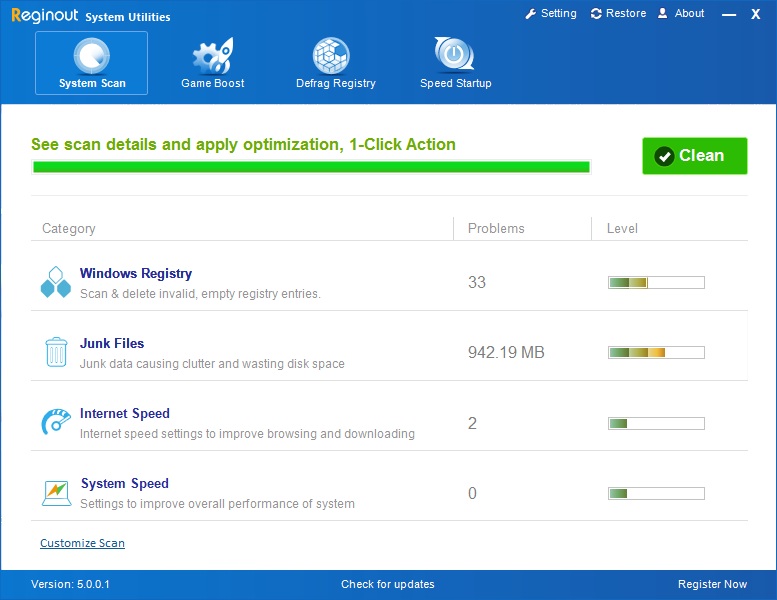
Winner of several industry 5-star awards, RegInOut cleans your computer for registry errors including ActiveX/Com, Shared Dlls, Invalid file associations etc Fixing these helps to speed up windows computer and in its smooth functioning.
FEATURES
Advanced Registry Scanner
Scans registry and computer for the following errors and repairs all problems found. Our registry cleaner software is fully compatible with Windows XP , Windows Vista and their 64 Bit versions
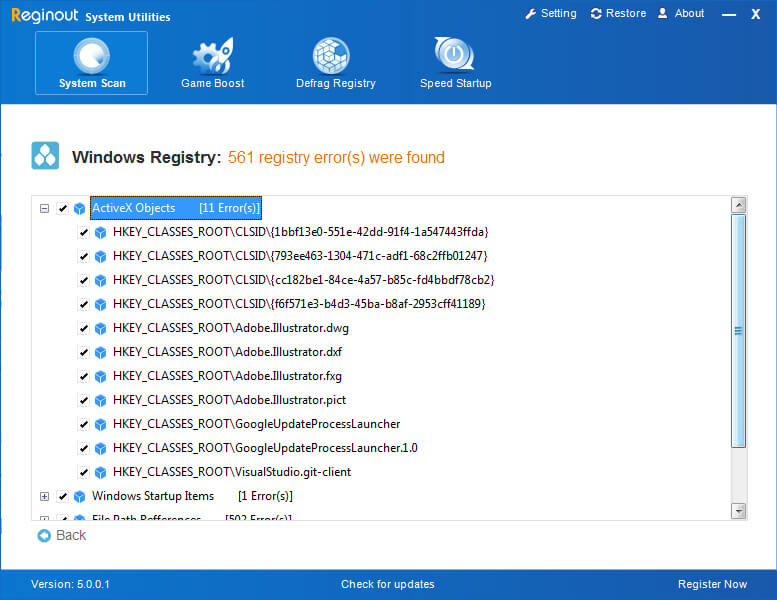
ActiveX/Com Errors
ActiveX and COM are individual modules designed to carry out specific tasks or functions. They can then be plugged into any program that has an interface set up to communicate with them. All ActiveX and COM controls have their entry in windows (XP / Vista) registry. Invalid entries of ActiveX and COM can cause different programs to give errors. RegInOut cleans these invalid entries to avoid any such errors.
Invalid Font Entries
Applications involving word processing often give errors related to invalid font entries. RegInOut removes all such entries so that your word processing applications perform functions without any errors.
Incorrect Help File Entries
An incorrect Help File entry in windows registry can cause a program to crash when you arelooking for its help file. With RegInOut you avoid such application crashes.
Invalid Application Paths
Application paths are a section in windows registry containing paths to various applications. Incorrect entries in this section can cause applications to give unexpected errors. RegInOut gives you the freedom to use applications without errors by removing invalid application path entries from Windows XP and Windows Vista registry.
Missing File/Folder Path References
RegInOut scans the whole windows registry to find the path entries of files / folders and checks them for inconsistencies to find invalid entries each time you scan. Cleaning them ensures error free running of computer programs also to make computer faster.
Windows Installer Errors
RegInOut removes invalid windows installer entries in registry for bothe Windows XP and Windows Vista. These entries burden the registry and are mainly caused by wrongly coded installer process of programs.
File Association Errors
File associations are binding of shell extensions with different programs. These bindings are saved in windows registry and invalid association can produce an error when you try to open a file which could frustrate you. RegInOut removes all the invalid file associations from the registry.
Windows Startup Errors
Startup entries in registry tell the windows to launch a program when it starts. Because of an invalid startup entry windows give an error detailing cannot launch the program, this results in a very slow start of windows. RegInOut keeps your startup entries consistent only valid entries can stay in this section of registry. Below you will also see how you can use RegInOut to manage your startup programs.
Invalid Shared Dll Entries
Dlls are files containing modules used by one of more than one programs at a time. Operating system loads the Dlls in its memory after reading information from its registry. An invalid shared Dll entry in windows registry can cause different type of conflicts. RegInOut helps you to avoid all such conflicts by removing all invalid Dll entries.
Empty Registry Keys
Empty registry keys neither have any value nor do they have any sub keys. They cause congestion in windows registry and are useless. RegInOut will not leave any empty entry in your whole registry.
Invalid Program Shortcuts
Along with so many types of registry errors RegInOut also enables you to remove invalid program shortcuts on your hard disk. The invalid shortcuts create mess on your desktop and folders and generate errors when you try to open files through them.
Slow PC Performance, Computer Freezing, Computer & Application Shutdown
The above mentioned carefully selected windows registry sections and other RegInOut features ensure that you will no longer suffer from computer freezing, Slow PC performance. Your Application software will no longer shutdown due to unwanted registry errors as you have the best registry cleaner on your side to make computer faster.
TopAutomatic Backups & Restore
Avoiding loss of any useful stuff in the windows registry was the prime concern while developing its registry cleaning module. That is the reason registry keys backup is automatically created when they are repaired. It is almost impossible that RegInOut is going to delete any valid key but nothing is perfect in the world and prevention is better than cure.
If you find any sort of problem after using RegInOut registry cleaning feature you can always restore its previous state by using the restore feature by selecting from the list of created backups. Backups are maintained in a list and are sorted according to date and time to make it easy for you.
Top
Scheduled Scans
While you are using the internet and different programs your registry keeps on storing data. A regular scan therefore is always recommended to get the best rate of optimization. We never wanted our customer to do manual scanning, so provided this feature for ease of use. The scheduled scan allows you to set up a time for scanning. RegInOut gets activated on that time to scan your registry for problems. You can also make use of other options to make this fully automatic.
You can set Automatic repair option so that when scan completes the problems are
automatically cleaned.
You can set option which tells RegInOut to shutdown when it has finished the repair work.
Managing Startup Program Entries
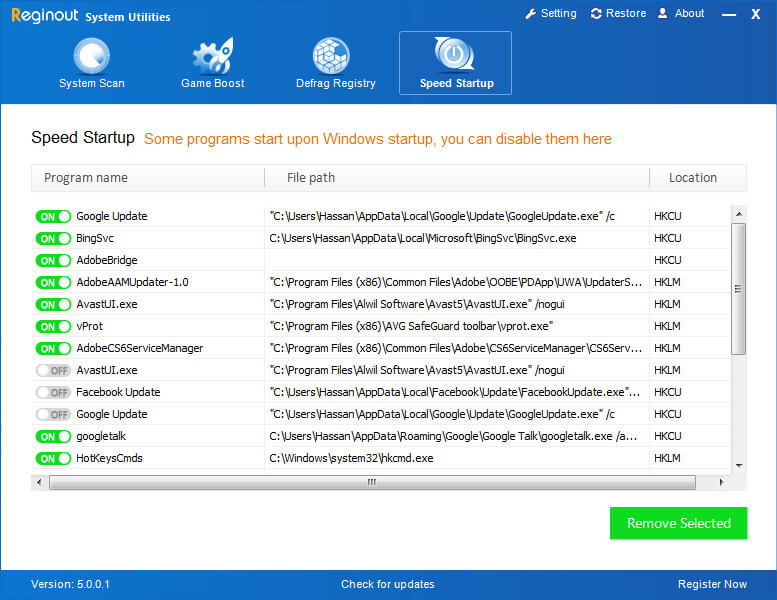
Startup entries in windows registry tell the windows to launch a program when it starts. Too many startup entries mean that windows will start all those programs when it starts resulting in a very slow and frustrating wait for you to be able to do any work on your PC. This feature is fully compatible with msconfig utility found on Windows Xp ,XP x64, Windows Vista and Vista x64.
Also many programs/services create such entries without the consent of user means you even do not know and will suffer from slow startup of windows. You will not be able to track many programs because they do not appear and start in background.
RegInOut provides a very easy way to manage all such entries. Users are presented with a list of all the startup entries where user can Enable, Disable or Remove any entry.
Top
Ignore List Management
RegInOut caters for different type of users and this feature is for relatively advanced users with knowledge of windows registry. If anyone due to some reason do not want to repair any specific key and want that RegInOut do not detect the key again as an error he/she can ignore such a key. Ignored key goes into a ignore list where it can also be removed afterwards.
Top
Summary Of Results
RegInOut stores the summary of results i.e what time the scan was performed, how many errors in different windows registry categories were detected. How many errors were cleaned and how many of them were sent to list of ignored keys.
Top